TWO FAMILIAR REQUESTS. TWO SERIOUS RISKS.
When a fake email carries your name.
“We've changed our bank account.
Please use our new account details for your next payment.”
Your customer could send money to a fraudster instead of your organization.
“I can't find the contracts you sent me.
Could you please forward them to me again?”
Your client could hand over a confidential contract to someone impersonating their CPA.
Illustrative examples of fraudulent messages, not actual client correspondence.
Why Fraudulent Emails Are Dangerous
When criminals send emails using a legitimate organization's name, they exploit the trust it has earned. A convincing signature, familiar wording or plausible address may be enough to persuade a customer to act.
Even if the genuine organization never sent the message, recipients may be deceived into making fraudulent payments or disclosing confidential documents and sensitive information. The impersonated organization may then face payment disputes, client complaints, lost business, reputational damage, and potential legal or regulatory consequences.
A fraudulent email can harm two parties: the person who acts on it and the organization whose name is misused.
SCENARIO 1
Fake Bank Details
The risk
A customer is tricked into paying a fraudster instead of the legitimate supplier.
The consequences
The supplier remains unpaid while the customer may lose funds. Both sides face payment disputes, damaged business relationships and reputational harm.
How Certidox helps
Customers can instantly check the recorded certifier and current status, then compare the certified subject and message body with the email received before acting on new payment instructions.
SCENARIO 2
Lawyer or CPA Impersonation
The risk
A client unknowingly sends confidential contracts or sensitive information to an impersonator.
The consequences
Unauthorized disclosure, compromised client confidentiality, legal exposure and damage to professional trust, even if the firm's systems were not breached.
How Certidox helps
Clients can verify whether a request matches the firm's certified email before sharing confidential information. Confidential documents should still be returned through a protected channel.
Revolut: a genuine government email domain, a fraudulent request
Revolut disclosed sensitive customer information after receiving fraudulent requests sent using an email address on a legitimate government-agency domain, according to reporting by The Wall Street Journal and TechCrunch.
The exposed information included identity and contact details, and could also have included account statements and transaction histories. Revolut said its own systems and customer funds were unaffected.
Where Certidox fits: Recipients can instantly verify who certified a Certidox-certified email, its exact certified content, certification date and current status. Authorization to obtain confidential information must still be confirmed separately through a trusted channel.
This incident did not involve Certidox. It does not establish that Certidox would have prevented the disclosure.
Verify Before Acting
A familiar display name, company logo or email signature is not proof that a message came from the person it claims to represent. When a consequential request arrives, recipients should verify the certification record and compare the content before relying on it.
What recipients should check
- Recorded originCheck which organization and sender are identified by the certification.
- Recipients and certification dateConfirm the destination information and when the message was certified.
- Current certification statusCheck whether the certification is still valid or has been revoked.
- Exact certified messageTap the View document button, then compare the subject and body with the email you received.
- Sensitive requests by a trusted channelVerify new bank details or requests for confidential records with a contact whose details you already know.
Scan. Check. Compare. Verify sensitive instructions before acting.
See a Certified Email in Action
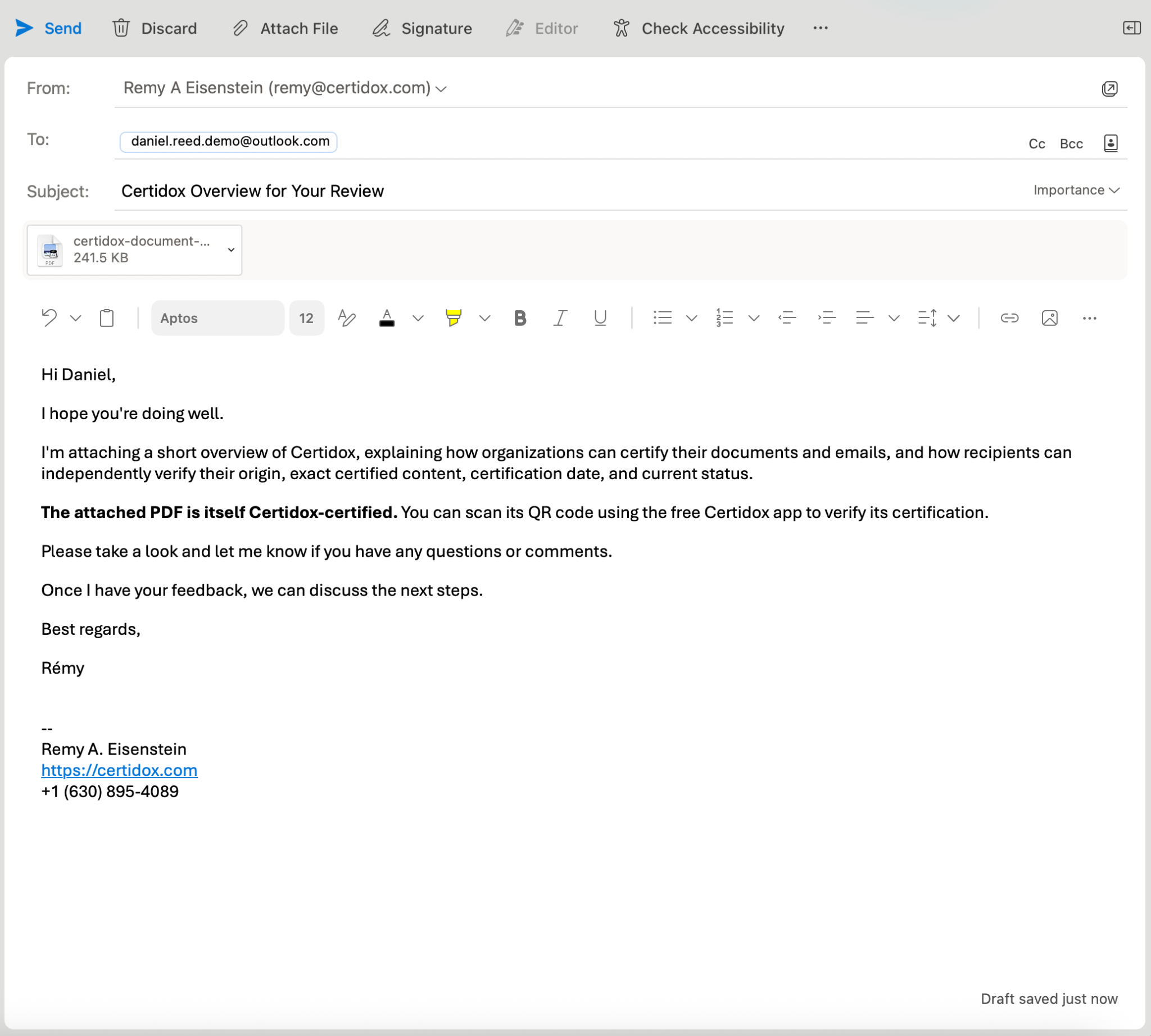
Follow a real Certidox demonstration from an Outlook draft to verifiable evidence. Rémy Eisenstein sends a message from remy@certidox.com to daniel.reed.demo@outlook.com, attaching a two-page Certidox overview PDF with its own certification. The six screenshots below all show this same demonstration. They do not depict the fraudulent scenarios or the Revolut incident discussed above.
- STEP 1 OF 6
Compose an ordinary email with a PDF
The email is titled Certidox Overview for Your Review. The sender uses Outlook normally and attaches a PDF that has its own Certidox QR code. Automatic email certification is performed separately by the configured Mail Proxy Server.
Original Outlook draft, before email certification. - STEP 2 OF 6
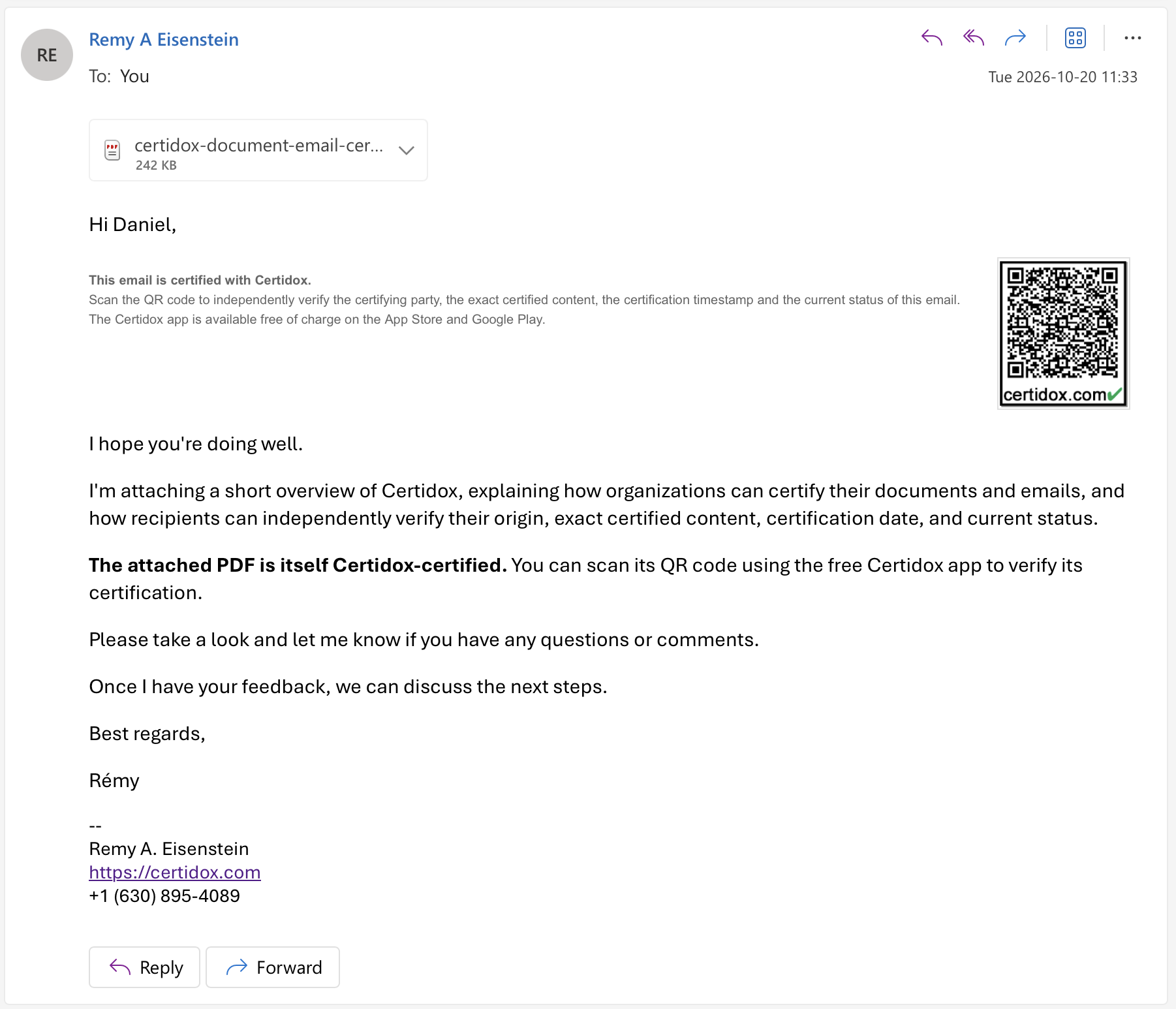
Receive the message and its Certidox QR code
The recipient-view screenshot shows the PDF attachment, message text and Certidox verification notice and QR code inside the email. The QR code points to the certification record; it is not sufficient on its own to authenticate any altered message.
Actual demonstration email displayed in Outlook, with its verification QR code. - STEP 3 OF 6
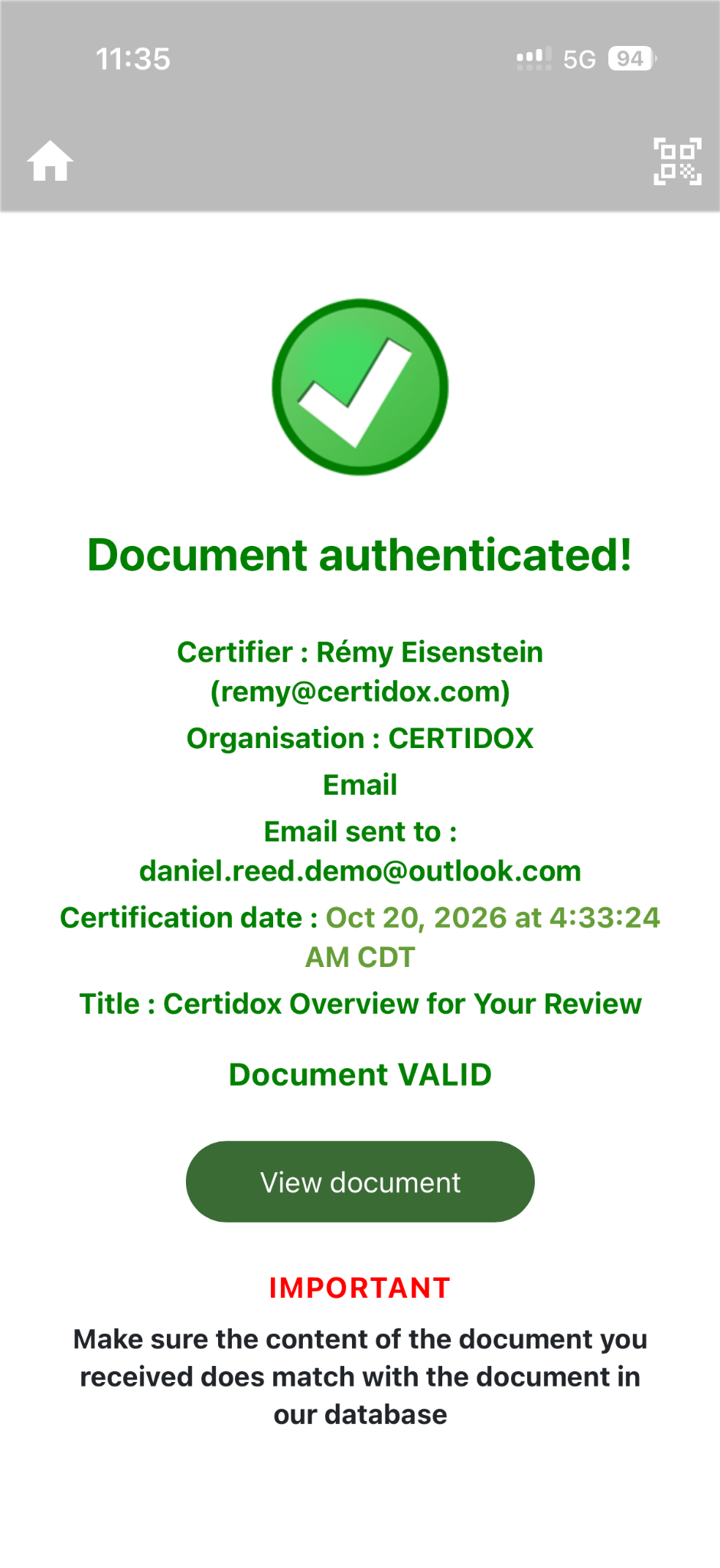
Check the certifier, recipient and current status
The Certidox app shows Rémy Eisenstein, organization CERTIDOX, the demo recipient, the recorded certification date and Document VALID at the time of capture. Perform a fresh scan to establish today’s status.
Real Certidox app verification result captured on October 20, 2026. The status shown is historical. - STEP 4 OF 6
View and compare the certified email content
Tap View document to inspect the certified reference. Compare the sender, recipient, subject, complete message body and recorded attachment information with what you received. The app screenshot shows only the first part of the message, so scroll to inspect the rest.
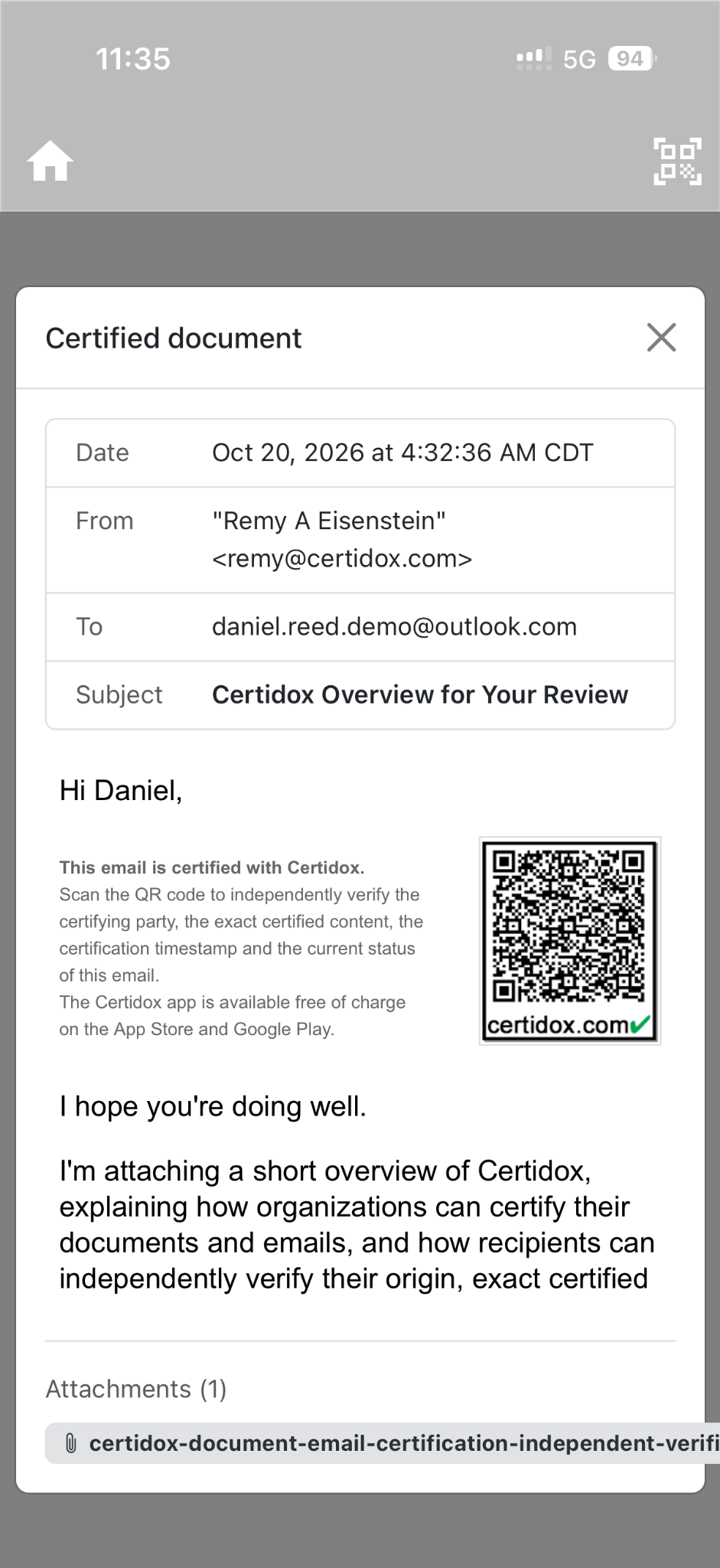
Actual View document screen. The email reference is structured, not a native .eml or an attachment-file download. - STEP 5 OF 6
Keep control after the email has been sent
The sender’s dashboard shows this email as Active at 4:33 AM CDT on October 20, 2026. Its certification can later be revoked without changing the historical record, and previous verifiers may receive status-change alerts if notifications are enabled.

Original Certidox dashboard row; click to inspect the full-width screenshot. The status shown is historical. - STEP 6 OF 6
Examine the evidence independently
The Independent Verification Bundle contains the encrypted certified email representation, its reading key, a SHA-256 manifest and an RFC 3161 timestamp response. The exact ZIP downloaded in this example is provided below; its hash matches the screenshot. Historical evidence and live certification status are different checks.
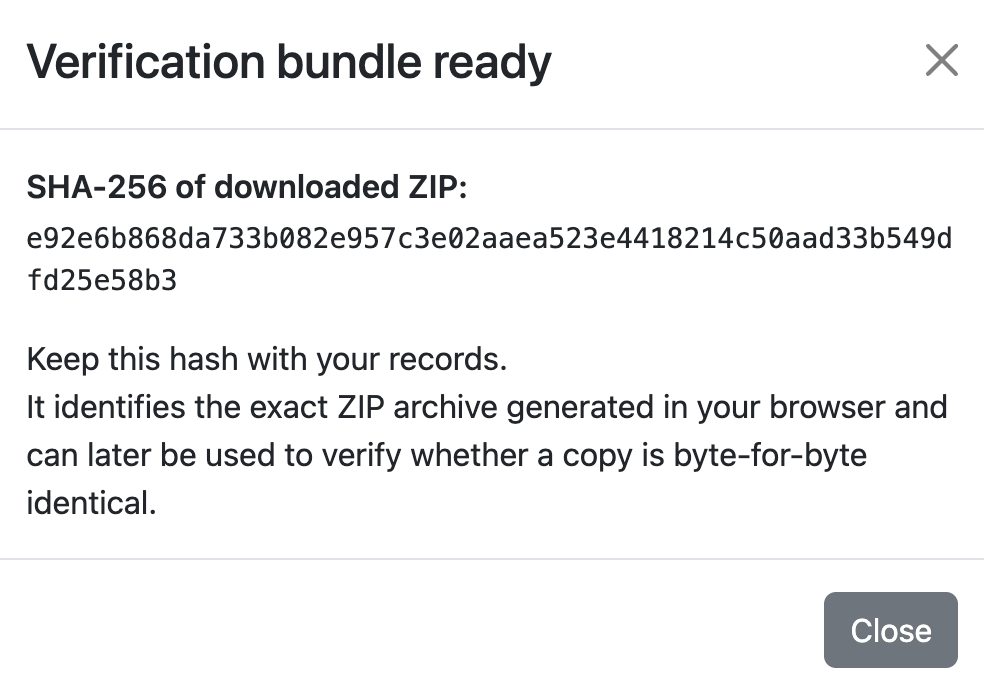
Original ZIP confirmation. The SHA-256 shown here is the hash of the downloadable sample below.
SHA-256 of the exact original ZIP: e92e6b868da733b082e957c3e02aaea523e4418214c50aad33b549dfd25e58b3
The email bundle can be used to reconstruct the certified email representation and examine its historical integrity and timestamp evidence. Its helper script downloads DigiStamp certificate material; independently validate the trusted root and certificate chain before relying on a timestamp result. The bundle does not prove delivery, reconstruct the attachment's bytes or establish the email's current certification status. The PDF has its own Certidox certification to verify separately.


What Your Organization Gains With Certidox
By certifying legitimate outgoing email automatically, organizations provide recipients with a way to check messages that purport to come from them.
- Verifiable emailsCustomers check recorded certification information and the exact certified message rather than trusting an email's appearance.
- Stronger business relationshipsA fixed certified reference can help clarify what the organization actually certified if a dispute develops.
- Control after distributionThe sender can revoke an email's certification. People who have previously verified that email can receive a real-time status-change notification if the sender chooses to notify them.
- Confidential by designThe Certidox Mail Proxy Server encrypts email content within the organization. Certidox servers do not store readable certified content or the corresponding decryption keys.
- Independently examinable evidenceIn the event of a dispute, an Independent Verification Bundle enables the independent examination of historical evidence of the certified content's integrity and certification timestamp
What Certidox Does and Does Not
Certidox automatically certifies your outgoing emails, allowing recipients to independently verify their origin, exact certified content, certification date and current status. It does not prevent an attacker from sending fake emails or guarantee that a recipient will perform a check. If an organization automatically certifies all its outgoing emails with Certidox, any email claiming to come from that organization without a verifiable Certidox certification should be treated as suspicious.
A QR code alone is not proof of authenticity: it can be copied into another message. Recipients must independently verify the recorded certifier and sender, exact certified content, certification date and current status, then compare the certified subject and body with the email received before relying on it.
Email certification does not by itself prove delivery, receipt or reading. The certified email reference may contain attachment filenames and metadata, but the actual attachment files are not reconstructed or independently authenticated by the email verification bundle.
Independent cryptographic tools can examine historical evidence, while the certification's current status requires a separate live check through Certidox.
Frequently Asked Questions
What is email impersonation?
Email impersonation occurs when someone sends a message that appears to come from another person or organization. The attacker may copy a familiar display name, email signature or business style to obtain money or confidential information.
Can a fake email damage the reputation of a company that never sent it?
Yes. Customers may associate a fraudulent request with the organization they believed they were dealing with. Payment disputes, lost trust and reputational damage can follow even when that organization did not send the email.
How can recipients check a Certidox-certified email?
Open the certification record using its Certidox QR code. Check the recorded certifier, sender, recipients, certification date and current status, then select View document and compare the certified message content with the email received.
Can a fraudster copy a genuine Certidox QR code into a fake email?
A copied QR code still leads to the original certification record, not to a new certification of the forged message. Recipients must compare the certified sender, recipients, subject and message body with the email they received; the QR code alone does not establish authenticity.
What if an email claims to come from an organization that certifies all outgoing emails with Certidox, but has no verifiable certification?
Treat it as suspicious. Do not act on payment instructions or requests for sensitive information until you have verified the message or confirmed it through an independent, trusted channel. A visible QR code alone does not establish authenticity: scan and verify the certification record, then compare the certified content with the received email.
Must recipients use the Certidox mobile app?
The free Certidox app is one way to check a certified email. Desktop verification and an Independent Verification Bundle provide other ways to examine certification information and historical cryptographic evidence. Current status must still be checked live through Certidox.
Can a sender revoke a certified email?
Yes. The sender can revoke its certification after sending. People who have previously verified the email can receive a status-change alert if the sender chooses to notify them.
Does Certidox prevent attackers from sending fake emails?
No. Certidox makes legitimate certified communications independently verifiable. It does not prevent attackers from sending messages, and recipients still need to check the record and compare the content before relying on it.
Does Certidox certify attachment content or prove email delivery?
Email certification does not by itself prove delivery, receipt or reading. The certified email representation can record attachment metadata, including filenames, but does not reconstruct or independently verify the contents of attached files. In the demonstration above, the attached PDF has its own Certidox QR code and must be verified separately from the email.
Protect Your Customers. Protect Your Name.
Certify legitimate outgoing emails automatically and let recipients verify the sender and certified message before relying on them.
For general context, see FBI: Business Email Compromise and FBI/IC3: Supplier and Attorney Impersonation. The two fictional email examples above are illustrative. The Revolut incident is independently reported and did not involve Certidox.